
Simple Driver for the IMX415 Sensor on Jetson Linux r32.6.1, Part 5 — V4L2 Controls
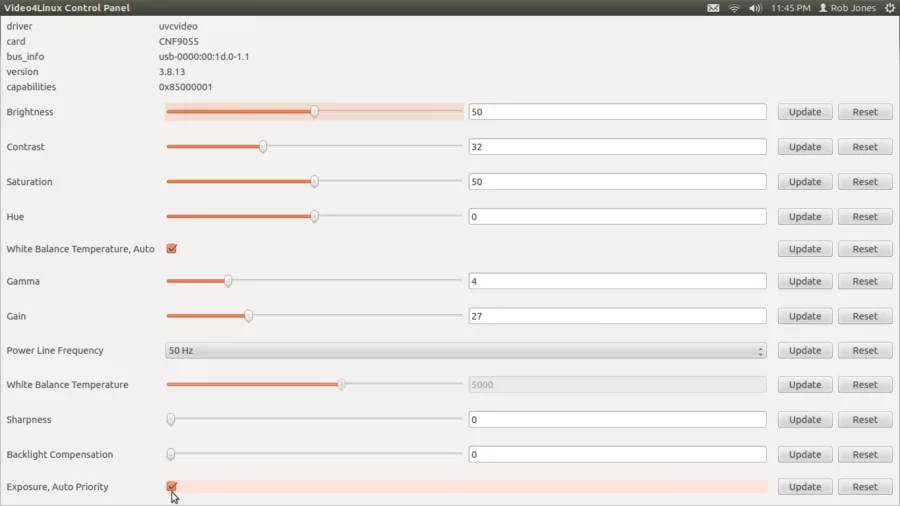
V4L2 (Video4Linux2) is the standard Linux kernel framework and API for real-time video capture and output. It provides a unified interface for applications, allowing them to work with video devices such as webcams, capture cards, and TV tuners. V4L2 is responsible for buffer allocation management, format configuration (resolution, frame rate), and streaming control, enabling functionality such as video recording, streaming, and computer vision.
V4L2 acts as a bridge between user-space applications (for example, VLC) and hardware drivers, handling complex kernel-level tasks, including codec management and media pipeline control. A particularly important role is played by V4L2 controls, which allow sensor parameters to be modified via the sensor driver. For example, brightness or black level can be adjusted.
In this article, we will examine how to add a new V4L2 control for black level control.
First, we locate the black level control information in the IMX415 sensor datasheet.
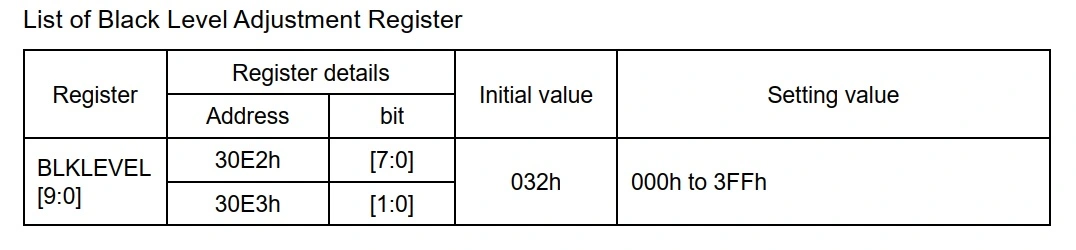
Add the corresponding registers to the driver:
#define IMX415_BLEVEL_VAL_ADDR0 0x30E2
#define IMX415_BLEVEL_VAL_ADDR1 0x30E3
Next, implement the black level control function:
static int imx415_set_blk_level(struct tegracam_device *tc_dev, s64 val)
{
struct camera_common_data *s_data = tc_dev->s_data;
struct device *dev = s_data->dev;
struct imx415 *priv = (struct imx415 *)tc_dev->priv;
int err;
err = imx415_write_reg(s_data, IMX415_BLEVEL_VAL_ADDR0, (u8)(val & 0xFF));
if (err) {
dev_dbg(dev, "%s: Group hold control error\n", __func__);
return err;
}
err = imx415_write_reg(s_data, IMX415_BLEVEL_VAL_ADDR1, (u8)((val >> 8) & 0x3));
if (err) {
dev_dbg(dev, "%s: Group hold control error\n", __func__);
return err;
}
return 0;
}
Declare the function prototype in the tegracam_ctrl_ops structure.
Open the file:
/include/media/camera_common.h
and add:
struct tegracam_ctrl_ops {
...
int (*set_blk_level)(struct tegracam_device *tc_dev, s64 val);
};
Next, locate the imx415_ctrl_ops structure in the driver and add a pointer to the new function:
static struct tegracam_ctrl_ops imx415_ctrl_ops = {
...
.set_blk_level = imx415_set_blk_level,
...
};
Adding a New V4L2 CID
Open the file:
/include/media/tegra-v4l2-camera.h
and define a new CID for the control.
In this example, ID 16 is used, but it is important to ensure that the value is unique:
#define TEGRA_CAMERA_CID_BLEVEL_SET (TEGRA_CAMERA_CID_BASE + 16)
Registering the Control
Open the file:
media/platform/tegra/camera/tegracam_ctrls.c
Locate the structure:
static struct v4l2_ctrl_config ctrl_cfg_list[]
and add a new entry:
{
.ops = &tegracam_ctrl_ops,
.id = TEGRA_CAMERA_CID_BLEVEL_SET,
.name = "set blacklevel",
.type = V4L2_CTRL_TYPE_INTEGER64,
.flags = V4L2_CTRL_FLAG_SLIDER,
.min = 0,
.max = 0xFFF,
.def = 0x3C,
.step = 1,
},
Add control handling in the tegracam_set_ctrls() function:
switch (ctrl->id) {
...
case TEGRA_CAMERA_CID_BLEVEL_SET:
err = ops->set_blk_level(tc_dev, *ctrl->p_new.p_s64);
break;
...
}
Also register the control in tegracam_check_ctrl_ops():
/* The below controls are handled by framework */
...
case TEGRA_CAMERA_CID_BLEVEL_SET:
...
mode_ops++;
break;
After making these changes, rebuild the driver modules:
make ARCH=arm64 O=$TEGRA_KERNEL_OUT modules -j4
In NVIDIA’s implementation, V4L2 is built as part of the kernel, so the kernel image must also be rebuilt:
make ARCH=arm64 O=$TEGRA_KERNEL_OUT Image -j4
After the build, replace /boot/Image on the Xavier NX SoC board.
Reboot the board and load the new IMX415 driver.
Verify that the new control is present:
v4l2-ctl --list-ctrls -d 0
If everything is correct, the new control will appear in the list
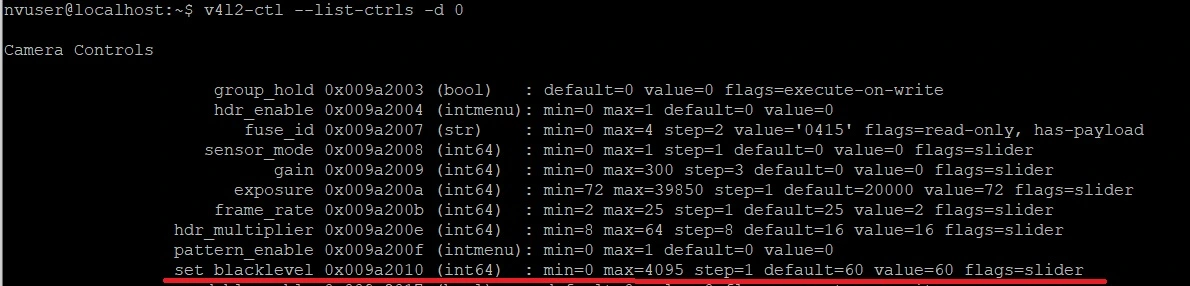
After starting the video stream, the black level can be adjusted using:
v4l2-ctl --set-ctrl set_blacklevel=60
where 60 is the desired value in decimal format.
We also design custom carrier boards for Jetson Orin NX / Jetson AGX Orin / Jetson Nano and Nano Super.